
Mi Browser
Screenshots

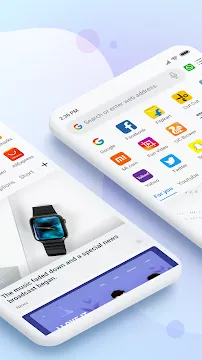

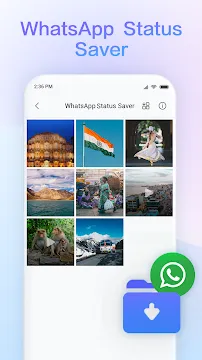
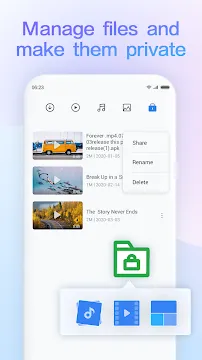

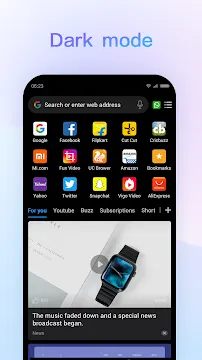
Mi Browser offers a streamlined way to surf the web on your mobile device. It focuses on speed and simplicity. Many pre-installed browsers feel heavy or cluttered. Mi Browser takes a different path. It removes unnecessary menus and buttons. You get a clean interface right from the start. This makes browsing feel faster and more direct. The app also includes smart features for daily use. For example, it handles downloads efficiently. It also manages data usage well. Therefore, users on limited plans benefit greatly. The design prioritizes your content over everything else. Let us explore why this browser stands out for everyday mobile browsing.
Why Choose Mi Browser for Your Daily Needs
First, consider the core browsing experience. Mi Browser loads pages quickly. It uses advanced rendering engines to boost speed. You will notice less lag when scrolling. The browser also blocks many intrusive ads by default. This keeps pages clean and easy to read. Second, the app saves battery life effectively. It limits background processes. Consequently, your phone runs cooler during long sessions. Third, the interface adapts to one-handed use. Key controls sit near your thumb. You can switch tabs or refresh a page without stretching. Additionally, the browser supports night mode. This feature reduces eye strain in dark environments. Many competing apps offer similar claims, but Mi Browser delivers consistently. Its reliability makes it a top choice for Android users seeking efficiency.
Key Features That Improve Your Browsing Speed
Mi Browser includes several performance-focused tools. First, the data saver mode compresses web pages. It can reduce data usage by up to 50%. This helps when you have a slow connection. Second, the download manager supports multiple file types. You can pause and resume downloads easily. Third, the browser cleans junk files automatically. It removes cache and cookies with one tap. Here is a quick list of other useful features:
- Incognito mode with no history tracking.
- Customizable search engine options (Google, Bing, Yahoo, etc.).
- QR code scanner built into the address bar.
- Gesture controls for back and forward navigation.
- Video playback pop-out for multitasking.
These features work without slowing down your phone. Each tool feels lightweight and responsive. You never wait for menus to open. The browser also updates regularly to fix bugs. Therefore, your experience improves over time.
How Mi Browser Protects Your Privacy Online
Privacy matters more than ever today. Mi Browser takes several steps to guard your data. First, it includes a private browsing mode. This mode leaves no local traces. No history, cookies, or form data gets saved. Second, the browser asks for minimal permissions. It does not need access to your contacts or messages. Third, you can block third-party cookies easily. A simple toggle in settings turns this on. Furthermore, the app notifies you about risky sites. It checks links against a database of known threats. This prevents phishing attacks. You also get control over location sharing. The browser only shares your location when you allow it. For added security, Mi Browser supports HTTPS upgrades. It automatically switches to secure connections when possible. These protections give you peace of mind. You can browse sensitive information without constant worry.
Customization Options Inside Mi Browser
Personalization makes any app better. Mi Browser lets you change several visual elements. First, you can pick from different homepage layouts. Options include a simple search bar or a site grid. Second, the font size adjusts to your preference. This helps users with visual impairments. Third, you can set default zoom levels for all pages. No more pinching to read small text. Here are other customization choices:
- Choose between light, dark, or auto night mode.
- Rearrange quick access links on the new tab page.
- Enable or disable the bottom address bar.
- Set download location (internal or external storage).
- Turn off image loading to save data.
These settings sync across your device. You do not need to reconfigure after an update. The interface remembers your choices. Moreover, advanced users can enable developer options. This allows experimentation with experimental web features. However, casual users will find the default setup perfectly usable. The flexibility ensures Mi Browser adapts to you, not the other way around.
Manage Tabs and Bookmarks Efficiently
Tab management can become chaotic quickly. Mi Browser solves this with a card-style tab switcher. You swipe up to see all open tabs. Each tab shows a preview of the page. Closing a tab requires only a sideways swipe. You can also group tabs by category. For example, keep news articles separate from work research. The bookmark system is equally intuitive. Save a page with one tap on the star icon. Organize bookmarks into folders afterward. The search function within bookmarks finds saved pages fast. Additionally, the browser syncs bookmarks across devices. Sign in with your Mi account to access them anywhere. The reading list feature saves articles for offline viewing. This works perfectly for commutes or flights. You never lose important content again. The entire system feels snappy and responsive. You will spend less time organizing and more time reading.
Conclusion
Mi Browser delivers a fast, secure, and customizable web experience. It strips away unnecessary clutter. You get clean pages, strong privacy controls, and useful tools. The app handles tabs, downloads, and bookmarks with ease. Its data saver and ad-blocking features save time and money. Night mode protects your eyes during late-night browsing. Customization options let you tailor the interface to your habits. Privacy features give you control over your personal information. Overall, Mi Browser competes well against heavier alternatives. It respects your device’s resources and your attention span. For Android users who value speed and simplicity, this browser is a smart choice. Try it for a week. You will likely forget you ever used another browser.